21-Day Automation Pilot
Prove your first two systems in 21 days.
Validate your Opportunity Map, then run your first two systems in shadow before anything goes live. $1,500, credited toward implementation. Then Basic at $500/mo if you continue.
21-Day Pilot: $1,500 · credited in full toward implementation for 12 months · one-time, does not renew
- Leak Report on Day 3
- Daily brief and 2 automations in draft by Day 7
- Results on Day 21
- No auto-enrollment
- Secure checkout by Stripe
Example
See a sample morning, start to finish.
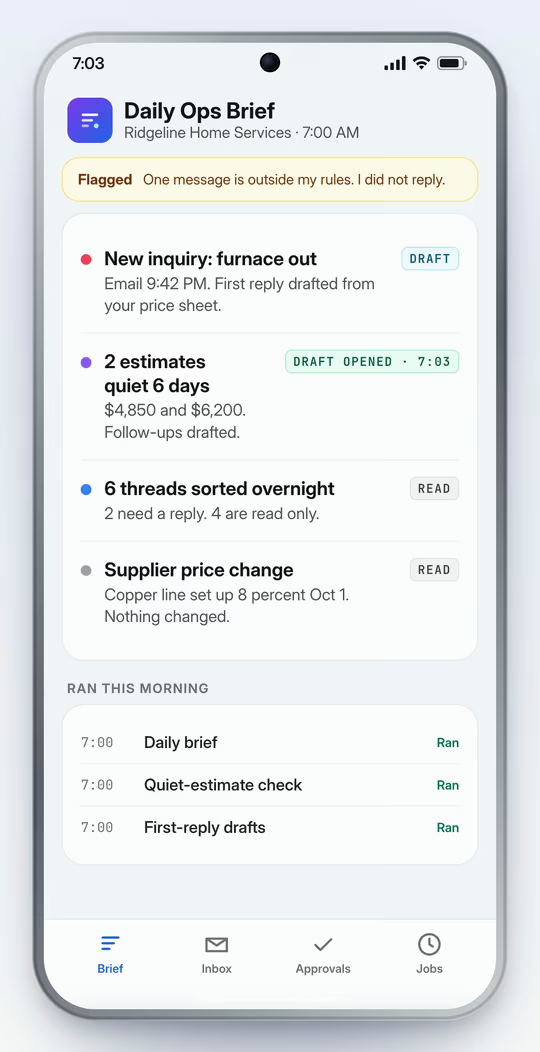
- A notification arrives: Daily brief is ready · 4 items, 3 for you.
- The owner opens the daily brief for Ridgeline Home Services: New inquiry: furnace out (draft), 2 estimates quiet 6 days (approval), 6 threads sorted overnight (read), Supplier price change (read).
- The owner taps the item waiting on them: Follow-up on the Park Ave condenser estimate. Drafted in your wording. Nothing is sent until you send it.
- The owner opens the draft. The item is marked Draft opened · 7:03.
- A second notification: One message is outside my rules. I did not reply.
2 Business Systems · 21-Day Automation Pilot
$1,500one time · 21 days
- Today
- $1,500, one time. Secure checkout by Stripe.
- Credit
- $1,500 setup credit: finish setup for $0 on Basic, $1,500 on Pro, $3,500 on Max. Good for 12 months.
- No auto-enrollment
- The Pilot never enrolls you in a plan. A plan starts only if you choose one.
- Your systems
- Your Opportunity Map is validated on the intake call, and the 2 systems are confirmed from the supported library.
Which systems?
Ready to connect (known path, confirmed at intake)
- Gmail
- Hostinger Business Email
- Other business mailbox (IMAP/SMTP)
- Google Calendar
- Stripe
Custom build, confirmed at intake (technical scope flagged at intake)
- Any other tool you run
- See 108 more listed tools →
- Terms
- One-time and non-refundable.
- After checkout
- You land on your onboarding checklist and book the 30-minute intake call, run by our closer.
What the 21-Day Automation Pilot includes
- Your Opportunity Map, validated on the intake call
- Your first 2 Business Systems, configured around your business
- A Leak Report on Day 3, from 90 days of mail
- A brief written each morning from Day 3
- Your 2 systems running in shadow mode
- Drafts you approve and send yourself. Customer sending is not enabled
- Day-21 results against your Day-3 baseline
- Business rules written from your documents
- The tools your 2 systems need, from the supported library, confirmed at intake
See which systems are supported today
Ready to connect (known path, confirmed at intake)
- Gmail
- Hostinger Business Email
- Other business mailbox (IMAP/SMTP)
- Google Calendar
- Stripe
Custom build, confirmed at intake (technical scope flagged at intake)
- Any other tool you run
- See 108 more listed tools →
The two systems set up first in the Pilot, shadow mode with drafts only
- Quiet-estimate follow-up. Drafts a follow-up for each quiet estimate.
- First reply to new inquiries. Drafted from your price sheet.
Your Opportunity Map and the Day-3 Leak Report show where time and money slip, so the next system you add is chosen from evidence, not guesses.
How the 21 days run
Seven moves. Nothing goes live unapproved.
- 01
Validate the Opportunity Map
- 02
Select the first two systems
- 03
Connect, build or configure
- 04
Run in shadow
- 05
You approve
- 06
Go live where safe
- 07
Day-21 results
The Pilot never auto-enrolls you in a plan. You decide at Day 21 whether a plan is worth it.
Day 3
Leak Report
Built from 90 days of your mailbox once you grant read access: quotes with no follow-up, inquiries first-replied after 24 hours, unanswered threads and your median first-response time, each with the messages cited. A small mailbox gives thin numbers and the report says so.
Day 7
Systems running in shadow
Your 2 systems run in shadow first. Every message they write is a draft you read, edit and send.
Day 14
Review and tune
You review the drafts and your edits tune the rules and templates. Customer sending is not enabled, so you send each message yourself.
Day 21
Results and plan
What ran, counted from the action log against your Day-3 baseline, and a plain recommendation on whether a plan is worth it.
You provide
- A 30-minute intake call, run by our closer
- Your SOPs, price sheet or FAQs
- Admin approval to connect the tools your 2 systems use
You get
- A Results Brief written from your connected mailbox
- 2 Business Systems running in shadow mode by Day 7
- A Scorecard against your Day-3 baseline
Implementation after your $1,500 credit
- Basic
- $0 of $1,500
- Pro
- $1,500 of $3,000
- Max
- $3,500 of $5,000
Credit valid 12 months from your Pilot payment.

Who builds it
Nigel Martin
I build, secure, and maintain the Business Systems myself. Based in Germantown, Maryland.
Is it for you
A good fit, and when to talk to us first.
A good fit if
- A team of 1 to 25
- Google Workspace or Hostinger Business Email today; Microsoft 365 by custom connection
- A recurring inbox or follow-up problem
- One person can review drafts for 21 days
- Your admin can approve the tools your 2 systems use
Talk to us first if
- Your tool needs a plan tier or admin access you cannot get
- There is no way to read or write in the tool the workflow depends on
- You want it to move money or delete records
No written SOPs? The Day-3 Leak Report is built from your mailbox.
Direct access
Direct access to the person building it.
You get direct access to me, a say in what gets built next, and a $1,500 setup credit valid for 12 months.
Pilot terms
One-time and non-refundable.
The Pilot is a one-time, non-refundable $1,500 and it does not renew. It never auto-enrolls you in a plan: no plan starts unless you choose one at Day 21, and a chosen plan then renews monthly through Stripe until canceled. The $1,500 is a setup credit toward Basic, Pro or Max, valid for 12 months.
Ready now?
$1,500 today, one time and non-refundable, with a setup credit for 12 months if you continue. No auto-enrollment.
30-second Fit Check
Check if your systems qualify.
Step 1 of 5
Before you start
What are the Pilot terms?
The $1,500 Pilot is one-time, non-refundable and does not renew. No plan starts unless you choose one at Day 21, and a chosen plan renews monthly through Stripe until canceled. The $1,500 is a setup credit for 12 months.
What if my software isn't supported?
Take the Fit Check first. It shows which of your tools are supported today. If a tool is not a fit, our closer tells you before you pay and says Talk to us first.
What happens when a system is unsure?
It stops. Anything outside its written rules is never answered on its own. It drafts what it safely can and puts the question in front of a person to decide.
Who holds the credentials during the Pilot?
You do. Your two systems are connected inside your own accounts with the narrowest access that works, and your admin can revoke it at any time without asking us.
How does the Pilot work?
Validate the Opportunity Map and pick two systems. Day 3: a Leak Report from your mailbox. Day 7: both systems running in shadow mode. Day 14: review the drafts and tune the rules. Day 21: results. No plan starts automatically.
What happens after the Pilot?
At Day 21 you get the Scorecard and a plain recommendation. You choose Basic, Pro, Max or nothing. No plan starts automatically.